How-to guide
How to Make a Travel Photo Book: 3 Workflows Compared
Learn three ways to make a travel photo book: a manual editor, an automatically generated tracker book, or a live travel journal that grows during the trip.
Keep comparing
Narrow down the choice
These comparisons are the best match for the decision you are making now.
A travel photo book can begin as a blank layout, as the output of a recorded route or as a journal that takes shape while the journey is still happening. Those methods produce different books because they ask you to remember the trip at different moments.
The useful question is not simply which service prints a good book. It is when the book begins, which material feeds it and how much of the design you want to control yourself.
The short answer
Choose a manual editor if
Selecting photographs, comparing fonts and shaping every spread are an enjoyable part of the project for you.
Choose a tracker-generated book if
The traveled route is the backbone of the story and you want the recorded journal to become a book with relatively little layout work.
Choose a live travel journal if
You want notes and photo choices to stay close to the actual day, with a book that is already assembled for a final review when the trip ends.
Choose a hybrid workflow if
You want to capture a concise journal during the trip but still rebuild the final pages later in a fully flexible editor.
Three ways to make a travel photo book
| Criteria | Manual editor | Tracker-generated book | Live travel journalNewer approach |
|---|---|---|---|
| Typical examples | CEWE and other specialist photo-book editors | Polarsteps or FindPenguins | WanderSpend |
| When the book takes shape | Usually after the trip, although mobile editing can start earlier | When a preview is generated from the recorded trip | Day by day, directly from the active trip |
| Source material | Camera roll, uploaded images, manually written text and maps | Steps or Footprints, route, stories, photos and trip statistics | DayCards, selected places, short notes and a small photo selection |
| Creative control | Highest control over typography, layout and image placement | Service-specific: editable in Polarsteps, deliberately more automated in FindPenguins | Focused page editing rather than unrestricted graphic design |
| Route approach | Added manually when wanted | Automatically recorded route is a central element | Route from deliberately selected places, without continuous tracking |
| Work pattern | A larger selection and design project, often after returning | Keep the travel log complete; refine the generated result | A few deliberate choices per travel day, then a shorter final review |
| Likely character | Individually designed photo album | Route-led visual trip record | Chronological journal written close to the moment |
| Main limitation | Time and selection effort | Book structure follows the tracker and its journal model | Requires a small daily habit and offers less free-form design |
The categories describe workflows, not rigid technical boundaries. A CEWE book can be started in the app while travelling. FindPenguins says its generated book can be ready before you arrive home. The difference is where the feedback loop sits: in a design editor, in a recorded travel profile or directly inside each travel day.
1. The classic route: design the book yourself
The manual workflow begins with an editor. You choose the photographs, decide how much space each image receives, write the text, add maps and keep adjusting pages until the rhythm feels right.
CEWE is a useful representative of this approach because its tools support templates, maps, personal text and detailed page design. The mobile app also means that “manual” does not have to mean “only after the trip”. Its defining quality is not timing but creative control.
This is the right route when making the book is part of the hobby. Someone who happily spends an evening comparing two typefaces, testing a full-page image and moving captions by a few millimetres is not looking for automation. The editor itself is part of the enjoyment.
Strengths
- + Maximum control over fonts, page rhythm and image size
- + Easy to combine phone photos, camera files, scans and older material
- + The physical design can be tailored closely to the traveler
- + A good fit when the editing process is a creative hobby
Limitations
- - A large camera roll creates substantial selection work
- - The project can remain unfinished for months after returning
- - Daily context must often be reconstructed from memory
- - Without notes or chronology, the result can become a polished but loose collection of favorite pictures
The last point is not a criticism of manual photo books. It is simply a consequence of starting with the image archive. If the notes were never written, no layout tool can recreate what made a particular evening, detour or conversation important.
2. The generated route: turn the recorded journey into a book
Polarsteps and FindPenguins begin with the travel record. Places, routes, photographs and stories already belong to Steps or Footprints. The book generator arranges that existing structure instead of asking you to begin with an empty spread.
Polarsteps automatically builds its Travel Book from the trip and includes routes, statistics, stories and photographs. Its editor then allows travelers to exclude content, rearrange images and adjust selected parts of the book.
FindPenguins is deliberately more automated. Its book is generated from the travel profile, including texts, dates, maps, photos and statistics. The service does not provide a fully free-form book editor; many changes are made in the underlying Footprints before the preview is recreated.
Strengths
- + The recorded route gives the book a ready-made chronological structure
- + Less blank-page work than a conventional editor
- + Stories, locations and statistics can remain connected to the photographs
- + Particularly natural for long routes where the path is part of the memory
Limitations
- - The book inherits gaps or weak entries from the travel log
- - Creative control depends on the service
- - Continuous tracking may be unnecessary for private or location-sensitive trips
- - The journal often serves the tracker first and becomes a book when a preview is requested
Choose this approach when the path matters: a long-distance cycle journey, an overland route or a multi-country train trip. If the precise route is not important, the tracker can create more data than the story actually needs.
For the product-level differences, continue with Polarsteps vs FindPenguins or Polarsteps vs Journi Blog.
3. The live route: let the photo book become the journal
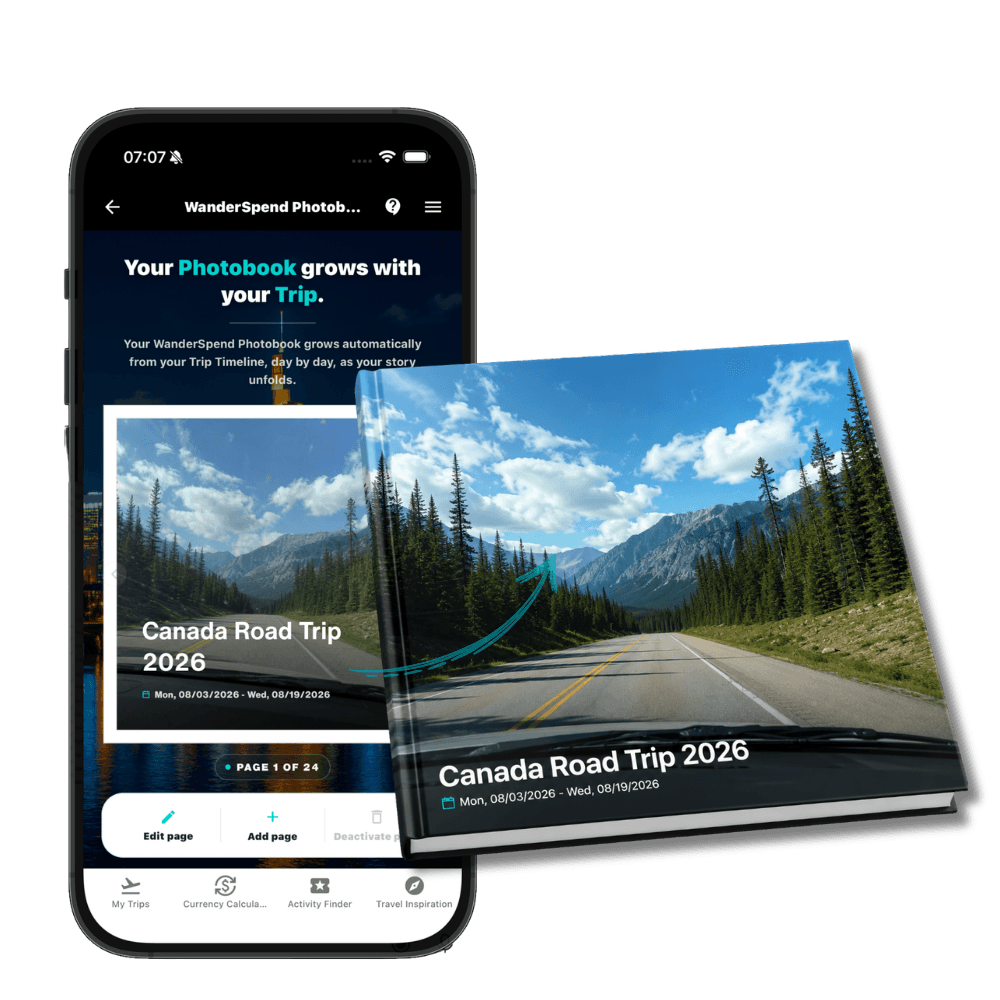
WanderSpend reverses the usual order. The Photobook preview is not only an output generated at the end. It is connected directly to the DayCards in the active trip.
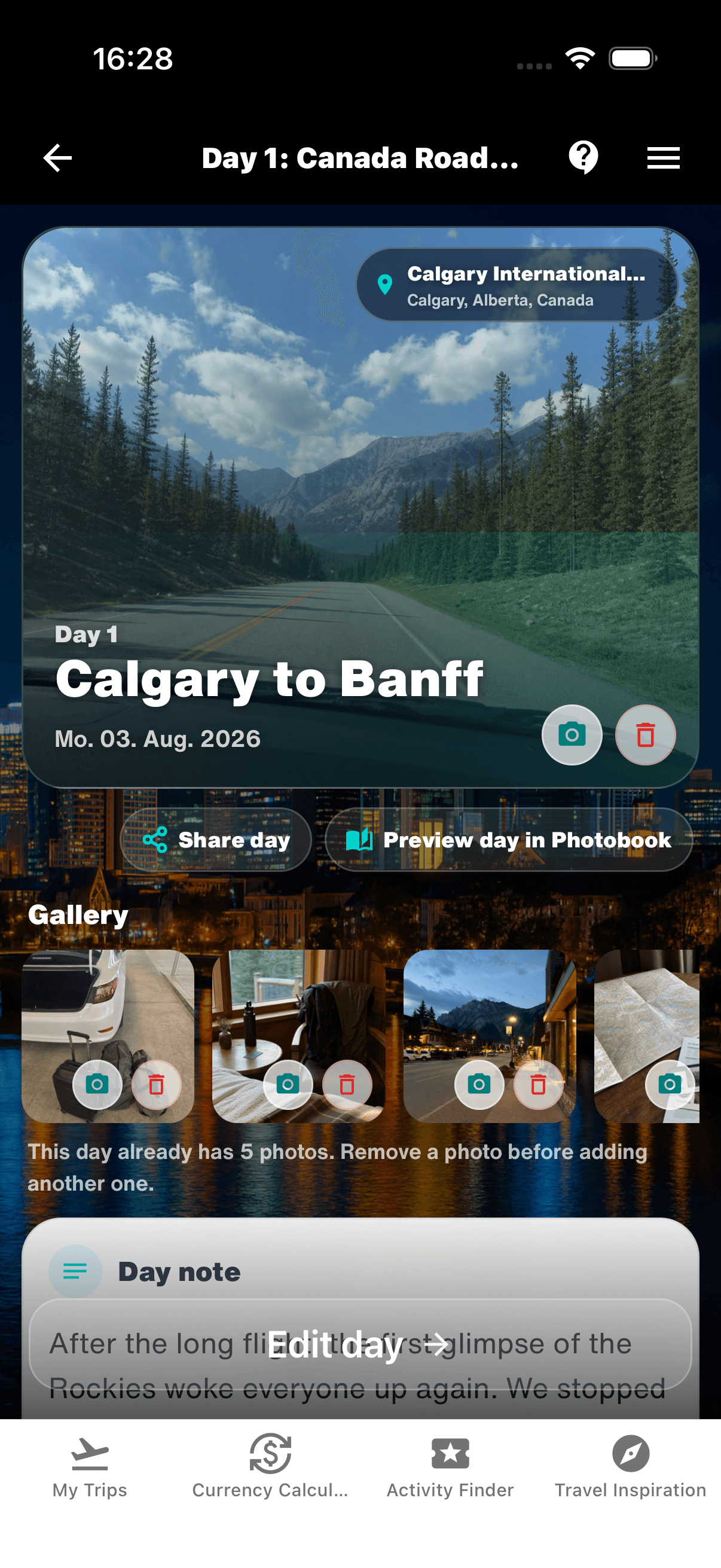
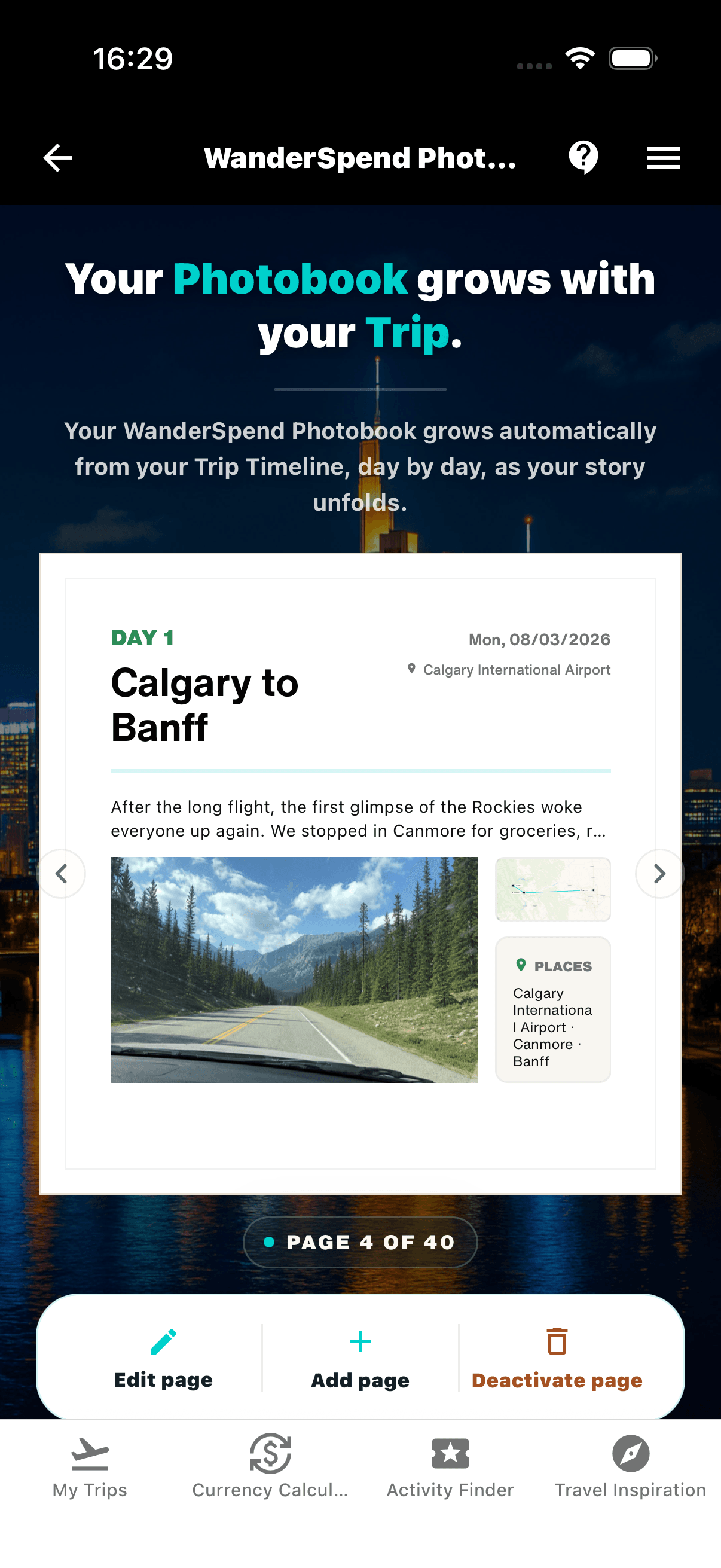
A DayCard brings together the places, a short day note, expenses and up to five selected photographs. Opening “Preview day in Photobook” shows the resulting page immediately. The next day adds the next part of the story. By the end of the journey, the book is already assembled and should need a considered final review rather than a complete reconstruction.
1. Complete the travel day

2. Review the book page immediately
That timing changes the character of the result. A note written on the evening of a rainy arrival remembers different details from a polished paragraph written several weeks later. A photo chosen on the day may show the small café, the tired train platform or the people at the table rather than only the most dramatic landscape in the camera roll.
The result is closer to a travel journal: chronological, selective and grounded in what the trip felt like at the time. The live preview also reveals gaps while they can still be fixed. If a day has five similar wide landscapes but no person, detail or transition, the weakness is visible before the journey moves on.
Strengths
- + The book is largely assembled by the end of the trip
- + Notes and photo choices stay close to the moment
- + The live preview exposes missing context while it can still be added
- + Places, documents, budget and memories remain inside the same private trip
Limitations
- - The workflow needs a short but regular travel-day habit
- - Typography and layout choices are intentionally narrower than in a specialist editor
- - Places are selected deliberately rather than recorded as a continuous route
- - WanderSpend is younger and is not a public travel-tracking network
This is not the right approach for everyone. If trying twenty layouts and finding the exact typeface is part of the pleasure, a conventional editor offers more room. If an exact background-tracked line is the central artifact, Polarsteps or FindPenguins is the more natural starting point.
See the concept in a real trip in How WanderSpend accompanied our Canada road trip.
How a photo book becomes a travel journal
The difference is not the number of photographs. It is the presence of context.
A useful travel-journal page usually preserves five things:
- A recognizable day title. “Train to Bergen in the rain” says more than “Day 4”.
- The places that shaped the day. Not every saved attraction needs to appear—only the stops that became part of the trip.
- A small, varied photo selection. Combine one establishing image with people, food, weather, transport or an ordinary detail.
- A short note written near the moment. Two honest sentences are often more valuable than a polished retrospective essay.
- A chronological position. The reader should understand what came before, what changed and where the journey went next.
This routine can support any of the three methods. The live workflow simply places it closest to the finished page.
A practical five-minute evening routine
You do not need to document the entire day while everyone else is still travelling. A short evening check is usually enough:
- Give the day a title you will recognize later.
- Confirm the places you actually visited, not everything that was planned.
- Choose three to five photographs that perform different jobs.
- Write what surprised you or changed the plan.
- Open the page preview and look for one obvious gap.
If this feels like work every evening, use the tracker-generated approach and write fewer, stronger entries. If even that interrupts the trip, collect the material and accept that the manual project will begin later. The workflow should preserve the journey, not compete with it.
Which workflow should you choose?
Choose the manual editor when detailed design is part of the reward. It offers the most freedom and makes sense for travelers who enjoy photo selection, typography and layout experiments.
Choose the tracker-generated book when the route is the main narrative. It reduces layout effort and keeps movement, places and travel stories closely connected.
Choose the live travel journal when you want the book to be largely ready at the end of the trip and want the words and photo choices to retain their in-the-moment character.
There is also a reasonable hybrid: keep concise daily notes and a deliberate photo shortlist while travelling, then rebuild the final book in a manual editor. It takes longer, but combines authentic journal material with maximum design control.
For app selection rather than workflow selection, compare the best travel photo book apps for 2026. If you are starting from Polarsteps, the focused Travel Book alternatives guide compares manual, generated and live workflows. The broader best travel journal apps shortlist covers journaling beyond print.
Related travel app comparisons
Best Travel Journal Apps: Polarsteps, FindPenguins, Journi and WanderSpend
The right travel journal app depends on whether you want automatic tracking, route files, social sharing, a flexible photo journal or a private trip space.
Journi Blog vs WanderSpend: Travel Journal and Photo Book Compared
Journi Blog is a flexible photo-journal and print ecosystem; WanderSpend is a private trip space whose photobook preview grows during the journey.
FindPenguins vs Polarsteps: Which Travel Tracker Is Better?
FindPenguins offers a fully free, flexible travel journal with strong GPX tools; Polarsteps offers the more polished tracking and sharing experience with optional Plus features.
Polarsteps vs Journi Blog: Travel Journal and Photo Books Compared
Polarsteps emphasizes route tracking and the journey; Journi Blog emphasizes flexible photo journals and a broad print-product workflow.
FindPenguins vs WanderSpend: Travel Journal or Private Trip Space?
FindPenguins turns routes, Footprints and photos into a shareable travel journal, while WanderSpend keeps maps, timelines, documents, budgets and memories in a private trip space.
FAQ
What is the best way to make a travel photo book?+
Use a manual editor when typography and page design are part of the pleasure. Use a tracker-generated book when the recorded route should lead the story. Use a live travel-journal workflow when the book should be largely complete and still feel close to the journey when you return.
Do I have to wait until after the trip to start a photo book?+
No. A manual book can be started in a mobile editor, and tracker services can generate a book once enough trip content exists. WanderSpend makes the book preview part of each travel day, so the pages can be reviewed throughout the active trip.
Can I edit an automatically generated travel book?+
It depends on the service. Polarsteps provides a Travel Book editor for photos, pages and selected sections. FindPenguins intentionally limits direct layout editing and asks travelers to adjust the underlying Footprints before recreating the preview.
What makes a travel photo book feel like a journal?+
Chronology, short notes written near the moment, meaningful places and a restrained photo selection give the book narrative context. A book made only from favorite images can still look good, but it usually says less about how the trip actually unfolded.
Does WanderSpend record the route automatically?+
No. WanderSpend uses deliberately selected places instead of continuous background route tracking. Polarsteps or FindPenguins are the more natural fit when an automatically recorded path is central to the book.
Is WanderSpend suitable for detailed typography and free-form layouts?+
Not in the same way as a specialist manual photo-book editor. Travelers who enjoy comparing fonts, moving every element and trying many page designs will have more creative freedom with a service such as CEWE.
Sources and verification notes
CEWE - Create your travel photo book
Official information about layouts, templates, maps, text and travel photo-book creation.
Last checked: 2026-08-24
CEWE - Create a city-trip photo book in the app
Official example showing that a manually designed photo book can also be started from the mobile app during a trip.
Last checked: 2026-08-24
Polarsteps - What is a Travel Book?
Official description of the automatically generated Travel Book using route, statistics, stories and photos.
Last checked: 2026-08-24
Polarsteps - Travel Book editing guide
Official information about previewing, selecting and rearranging Travel Book content.
Last checked: 2026-08-24
FindPenguins - Your Travels in a Book
Official description of photo books generated from the texts, dates, maps, photos and statistics in a travel profile.
Last checked: 2026-08-24
FindPenguins Support - How do I edit my photo book?
Official explanation of the deliberately limited book editor and the Footprint-based editing workflow.
Last checked: 2026-08-24
WanderSpend - Before, during and after a trip
Official workflow for DayCards, selected photos, notes and the live Photobook preview.
Last checked: 2026-08-24
Official demonstration of the live travel-journal and Photobook concept.
Last checked: 2026-08-24