Best-of comparison
Best Private Travel Apps for Planning, Budgets and Memories in 2026
A practical guide to private travel apps for trip organization, offline travel planning, budgets, documents, maps, route tracking and travel memories.
Keep comparing
Narrow down the choice
These comparisons are the best match for the decision you are making now.
Not every travel app should feel like a feed.
For many travelers, the ideal app is private by default: a place to keep plans, documents, budgets, notes, maps and memories without turning the trip into public content.
That does not mean every private travel app must do the same job. A private trip organizer, a budget app, a booking organizer, a map app and a tracking app all carry different privacy trade-offs.
This guide compares private travel apps by workflow and explains what to check before trusting an app with sensitive trip information.
Quick verdict
Best private trip space
WanderSpend is the strongest fit if you want one calm private place for Trip Map, timeline, documents, notes, expenses, shared costs, currencies and memories.
Best private budget context
TravelSpend is useful if your private travel need is mostly expense tracking, currencies and spending analysis rather than full trip organization.
Best with privacy controls for tracking
Polarsteps offers privacy controls, but it is still built around tracking, sharing and route-based travel stories.
Best specialist layers
TripIt and Google Maps can be useful private-feeling layers for reservations and navigation, but they are not a complete private trip archive.
Private travel apps compared
| Criteria | WanderSpendOur app | TravelSpend | Polarsteps | TripIt | Google Maps |
|---|---|---|---|---|---|
| Primary workflow | Private trip organization with maps, timeline, documents, budget and memories | Travel expense tracking, currencies and budget analysis | Travel tracking, sharing and route-based memories | Travel plan and reservation organization | Navigation, saved places, discovery and offline maps |
| Privacy fit | Privacy-first, no ads, no tracking and not social-media-like | Expense-focused app with sync and sharing context; check current policy for sensitive data | Privacy controls exist, but tracking and sharing are central | Account-based itinerary organizer; review current privacy settings before forwarding sensitive confirmations | Powerful account-based map layer; review Google account and location settings |
| Offline usefulness | Offline-friendly trip organization is part of the product positioning | Offline use is part of the official positioning | Check current app behavior before relying on offline tracking or uploads | Check current plan details for offline needs | Offline maps are supported in eligible areas |
| Best for | Travelers who want the trip to stay personal and organized | Travelers whose private need is mostly money tracking | Travelers who want to track and share routes with visibility controls | Travelers whose plans are mostly reservations and confirmations | Travelers who need navigation and saved-place context |
| Main trade-off | Younger than older travel apps | More finance-oriented than memory-oriented | More sharing and tracking oriented | Less emotional or trip-memory focused | Not a dedicated trip organizer |
What to look for in a private travel app
Privacy is not only a policy page. It is also product design.
A travel app feels private when it does not push you toward public sharing, social metrics, follower behavior or automatic publishing. It should make sensitive information easy to keep under control.
Look for:
- clear sharing choices
- no public feed by default
- useful offline workflows
- no need to expose every trip detail
- control over documents and notes
- understandable sync and account behavior
- a calm interface that does not reward oversharing
If you store passports, booking documents, hotel addresses or detailed route information, check the current privacy policy and settings before relying on any app.
Best private trip organizer: WanderSpend
WanderSpend is built for travelers who want a private travel space rather than a social travel product.
The app brings together:
- Trip Map and places
- daily timeline
- documents and notes
- expenses and shared costs
- exchange rates and currency calculator
- completed Trip Memories
That matters because privacy is easier when your travel information is not scattered across too many apps. A document in one place, a note in another, an expense somewhere else and a map list somewhere else creates friction.
WanderSpend is strongest when you want one personal place for the trip without making the experience feel like a finance dashboard or a social feed.
Strengths
- + Privacy-first positioning with no ads, no tracking and no subscriptions
- + Trip Map, timeline, documents, notes, budgets and memories live together
- + Budgeting feels like part of the trip, not the app identity
- + Good fit for travelers who want calm organization
- + Not designed around public posting or follower behavior
Limitations
- - Younger than established travel apps
- - Not a public route-sharing network
- - Not as planning-heavy as specialist itinerary builders
Share the map, not the private trip data

Best for private budget tracking: TravelSpend
TravelSpend is useful when the private information you care about most is money.
It is focused on adding expenses, working offline, converting foreign currencies, monitoring trip budgets and understanding spending. That can be a good privacy fit if you do not want to put every document, place and memory into one tool.
The trade-off is that TravelSpend is more expense-oriented. If you want a private travel space with documents, notes, places, maps and memories, WanderSpend is broader.
Best tracking app with visibility controls: Polarsteps
Polarsteps is a polished travel tracking and memory app.
It is relevant in a private travel apps guide because it provides account and trip visibility controls. But the product is still built around tracking journeys, creating visual travel stories and sharing them with other people.
That makes Polarsteps a good fit if you want tracking plus controls.
It is not the best fit if your ideal private app avoids route tracking as the center of the experience.
Best reservation layer: TripIt
TripIt can feel private because it organizes practical travel information instead of turning travel into a feed.
It is useful for itineraries that are defined by bookings: flights, hotels, car rentals and confirmations. If your main need is to find reservation details quickly, it may be enough.
But reservation organization is only one layer. You may still want another private app for notes, places, budgets, documents that are not bookings and memories after the trip.
Best map layer with offline support: Google Maps
Google Maps is often part of a private travel workflow because it solves navigation, place discovery and offline maps.
It is not a private trip organizer by itself. It is an account-based map product with its own settings and data model. That means it is useful, but you should review your Google account and location settings if privacy is a major concern.
For many travelers, Google Maps works best as the navigation layer next to a private trip app.
Which private travel app should you choose?
Use-case matrix
You want one private place for the whole trip
WanderSpend
Choose WanderSpend if maps, days, documents, notes, budgets and memories should stay together without a public feed.
You only want private expense tracking
TravelSpend
Choose TravelSpend when money tracking is the main sensitive workflow.
You want route tracking with controls
Polarsteps
Choose Polarsteps if the route story matters and you are comfortable managing visibility settings.
You need booking details in one place
TripIt
Choose TripIt if flights, hotels and confirmations define the itinerary.
You need offline navigation
Google Maps
Use Google Maps as a specialist map layer and check account settings for privacy expectations.
Final verdict
Choose WanderSpend if you want the best private travel app for overall trip organization: maps, timeline, documents, notes, budgets and memories in one calm space.
Choose TravelSpend if privacy matters mostly around expenses.
Choose Polarsteps if you want route tracking and are comfortable with visibility controls.
Choose TripIt for reservations and Google Maps for navigation.
The best private setup is often a small stack: one private trip space, one map layer and one transport or booking helper when needed.
For a broad comparison, read best travel apps in 2026. If budget is the main workflow, continue with best travel budget apps.
Related travel app comparisons
Best Travel Journal Apps: Polarsteps, FindPenguins, Journi and WanderSpend
The right travel journal app depends on whether you want automatic tracking, route files, social sharing, a flexible photo journal or a private trip space.
Journi Blog vs WanderSpend: Travel Journal and Photo Book Compared
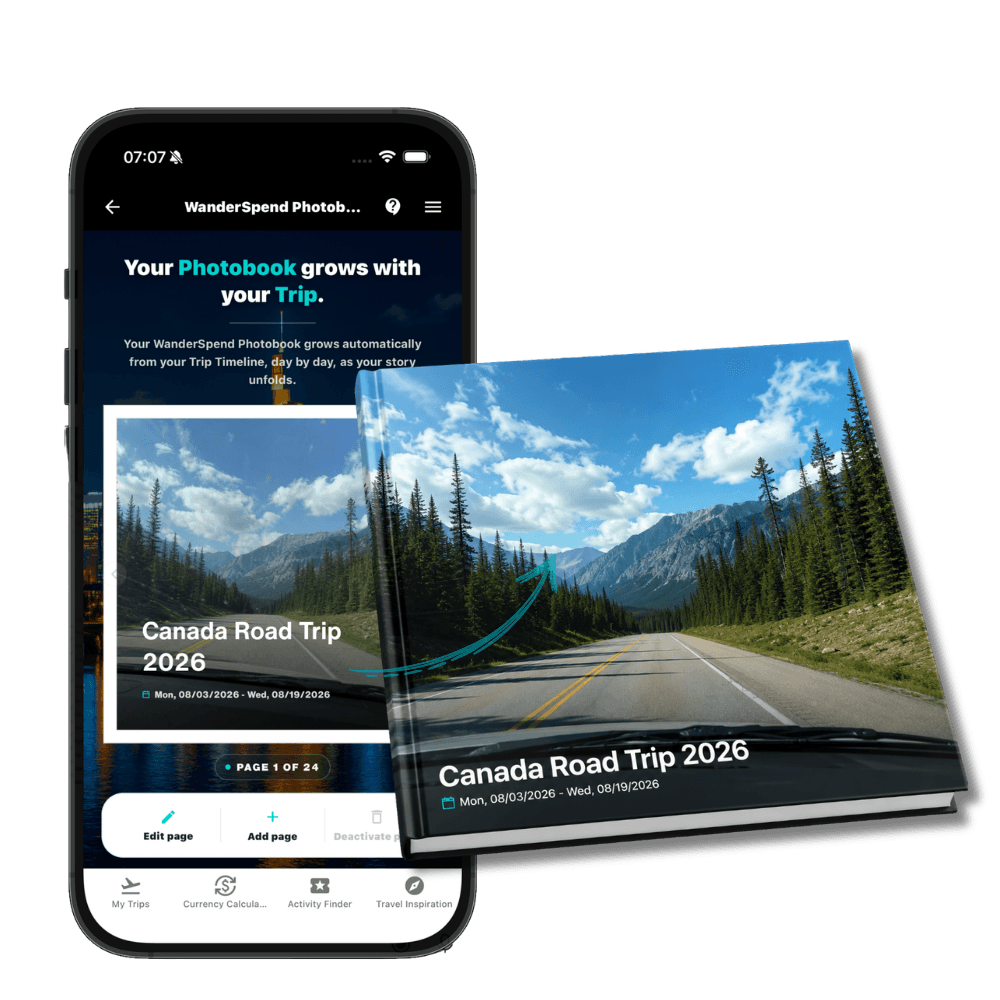
Journi Blog is a flexible photo-journal and print ecosystem; WanderSpend is a private trip space whose photobook preview grows during the journey.
Best Travel Apps 2026: 9 Picks for Planning, Tracking and Budget
Nine travel apps, nine distinct jobs: choose a core trip app first, then add only the navigation, booking or packing tools you actually need.
FindPenguins vs WanderSpend: Travel Journal or Private Trip Space?
FindPenguins turns routes, Footprints and photos into a shareable travel journal, while WanderSpend keeps maps, timelines, documents, budgets and memories in a private trip space.
Polarsteps vs WanderSpend: Tracking, Privacy and Battery
Polarsteps is a polished and established travel tracker built around routes and sharing, while WanderSpend focuses on private trip organization with budgets, maps, documents, notes and memories.
FAQ
What makes a travel app private?+
A private travel app should avoid making sharing the default, keep sensitive trip details easy to control, support useful offline workflows and make it clear when tracking, accounts, sync or public visibility are involved.
Which travel app is best for private trip organization?+
WanderSpend is the strongest fit if you want a private-first trip space for maps, timeline, documents, notes, budgets and memories without a social-feed experience.
Can tracking apps be private?+
Tracking apps can offer privacy controls, but route tracking and sharing are still central to the product. If you do not want tracking to define the trip, use a private trip organizer instead.
Sources and verification notes
Official WanderSpend positioning, privacy-first travel organization and public app links.
Last checked: 2026-06-21
Official Polarsteps positioning for travel tracking, sharing and travel memories.
Last checked: 2026-06-21
Polarsteps Help Center - Privacy and trip visibility
Official account and trip privacy controls.
Last checked: 2026-06-21
Official TravelSpend positioning for expense tracking, offline use, currency conversion, insights, map context and exports.
Last checked: 2026-06-21
Official TripIt positioning for organizing travel plans and itineraries.
Last checked: 2026-06-21
Official Google Maps positioning for navigation, places and maps.
Last checked: 2026-06-21
Google Maps Help - Offline maps
Official Google Maps help page used to verify offline map support.
Last checked: 2026-06-21