Best apps
Best Travel Photo Book Apps 2026: Five Workflows Compared
Compare the best travel photo book apps for manual design, automatic route books, photo journals and a live photobook that grows during the trip.
Keep comparing
Narrow down the choice
These comparisons are the best match for the decision you are making now.
The best travel photo book app is not necessarily the one with the longest feature list. It is the one that asks you to work at the right moment.
Some travelers want a blank canvas after the trip. Others want the recorded route to assemble the story. A third group would rather keep a short journal while travelling and return with a book that already has a beginning, middle and end.
This comparison covers those workflows. It deliberately leaves prices out because formats, page counts, delivery regions and promotions make a simple number misleading.
Quick verdict
Choose CEWE if
designing the book is part of the hobby and you want detailed control over fonts, photographs and every page.
Choose Polarsteps if
an automatically recorded route should lead the story and you want a dedicated Travel Book editor afterward.
Choose FindPenguins if
you want the travel profile to become a professionally arranged book with very little layout work.
Choose Journi if
you prefer a photo-first journal, collaborative memories and a broader print-product workflow.
Consider WanderSpend if
you want a private trip space whose journal and photobook preview grow day by day during the journey.
The five travel photo book apps at a glance
| Criteria | CEWE | Polarsteps | FindPenguins | Journi | WanderSpendOur app |
|---|---|---|---|---|---|
| Starting point | Selected files and a page editor | Recorded trip, Steps and route | Travel profile and Footprints | Photo journal and timeline | Private trip, DayCards and selected places |
| When the book takes shape | During a manual design project | When a Travel Book preview is generated | When the profile is turned into a generated book | From the journal into a print workflow | Day by day during the active trip |
| Route in the story | Optional and manually added | Central, from automatic tracking | Central when the tracker is used | Built mainly from photo and journal context | Built from deliberately selected places |
| Design freedom | Highest | Dedicated editor within the Travel Book structure | More automated; many changes begin in Footprints | Several print configurations and photo-journal choices | Focused page adjustments rather than free-form design |
| Distinctive strength | Creative control | Polished route-to-book workflow | Fast automatic arrangement | Flexible journal and print ecosystem | Live feedback while the trip is happening |
| Main trade-off | Time and selection effort | The book inherits the tracker structure | Less direct page editing | Less route-led and less focused on practical trip organization | Needs a small daily habit and offers fewer layout choices |
1. CEWE: best for detailed manual design
CEWE represents the classic photo-book route. You select material from the camera roll or computer, choose a format and then shape the pages yourself. Templates and automatic suggestions can speed up the beginning, but the editor still gives you room to change fonts, image sizes, backgrounds and page rhythm.
That control is the point. If you enjoy comparing typefaces, building a panorama spread and moving a caption until the balance feels right, the design work is not a problem to automate away.
Strengths
- + Strong control over typography, image placement and page layout
- + Useful for combining phone photos, camera files, scans and older material
- + Templates can accelerate the first draft without removing manual control
- + The physical design can be tailored closely to the trip
Limitations
- - A large camera roll creates substantial selection work
- - The project commonly begins after the trip, when context is already fading
- - Detailed editing can take many evenings
- - A polished album still needs notes and chronology if it should read like a journal
Choose CEWE when the hours spent designing are part of the enjoyment. Do not choose it merely because it is familiar if the unfinished photo-book folder from the last trip is already waiting on your computer.
2. Polarsteps: best for a route-led Travel Book
Polarsteps starts with the journey rather than the empty page. Its Travel Book draws on the recorded route, Steps, stories, photographs and trip statistics. A separate editor then lets you review and adjust the generated result.
This approach works particularly well for road trips, overland journeys and long-distance routes. The path is not decorative—it explains the sequence of the trip.
Strengths
- + Route, stories, photographs and statistics stay connected
- + Less blank-page work than a conventional editor
- + Dedicated Travel Book editor after generation
- + Natural fit for trips where movement is part of the memory
Limitations
- - The book inherits gaps and weak entries from the recorded trip
- - Automatic tracking requires background location access
- - The visual structure remains tied to the Polarsteps model
- - Travelers who want unrestricted typography and layouts may feel constrained
If the book workflow is the main reason you are considering the app, continue with Polarsteps Travel Book alternatives.
3. FindPenguins: best for a highly automated travel book
FindPenguins also turns the travel profile into a book. Texts, maps, photographs, dates and statistics already exist in the Footprints, so the service can arrange them without asking the traveler to build each spread.
Its strength is low layout effort. Its limitation follows from the same decision: FindPenguins is not a fully free-form page editor. For many changes, you revise the underlying Footprints and create the preview again.
Strengths
- + Professionally arranged book from existing travel-profile content
- + Chronology and maps are already connected to the photographs
- + Very little dragging, dropping or formatting
- + Useful for travelers who want a finished structure quickly
Limitations
- - Many corrections begin in the Footprints rather than on the book page
- - Less suitable for typography enthusiasts
- - The result follows the logic of the travel profile
- - Automatic tracking and the social profile may be more than a private journal needs
For the closest tracker comparison, read FindPenguins vs Polarsteps.
4. Journi: best for a photo-first journal and print ecosystem
Journi begins with photographs and journal entries. Maps and timelines provide travel context, but the service also extends to family albums and everyday memories. That broader journal model continues into several physical print choices.
Choose Journi when the photographs and collaborative journal matter more than a continuously tracked line. It is also a practical fit when one service should cover both trips and other family photo projects.
Strengths
- + Photo journals work for travel and other life events
- + Collaborative journals suit couples, families and groups
- + Several print configurations and related products
- + Maps and timelines add context without making the route the only organizing idea
Limitations
- - Less route-led than Polarsteps or FindPenguins
- - The broader print ecosystem creates more choices to review
- - Not centered on documents, travel budget or shared costs
- - Travelers wanting a deliberately minimal private trip space may find more product than they need
The direct decision is covered in Polarsteps vs Journi Blog and Journi Blog vs WanderSpend.
5. WanderSpend: the live travel-journal approach
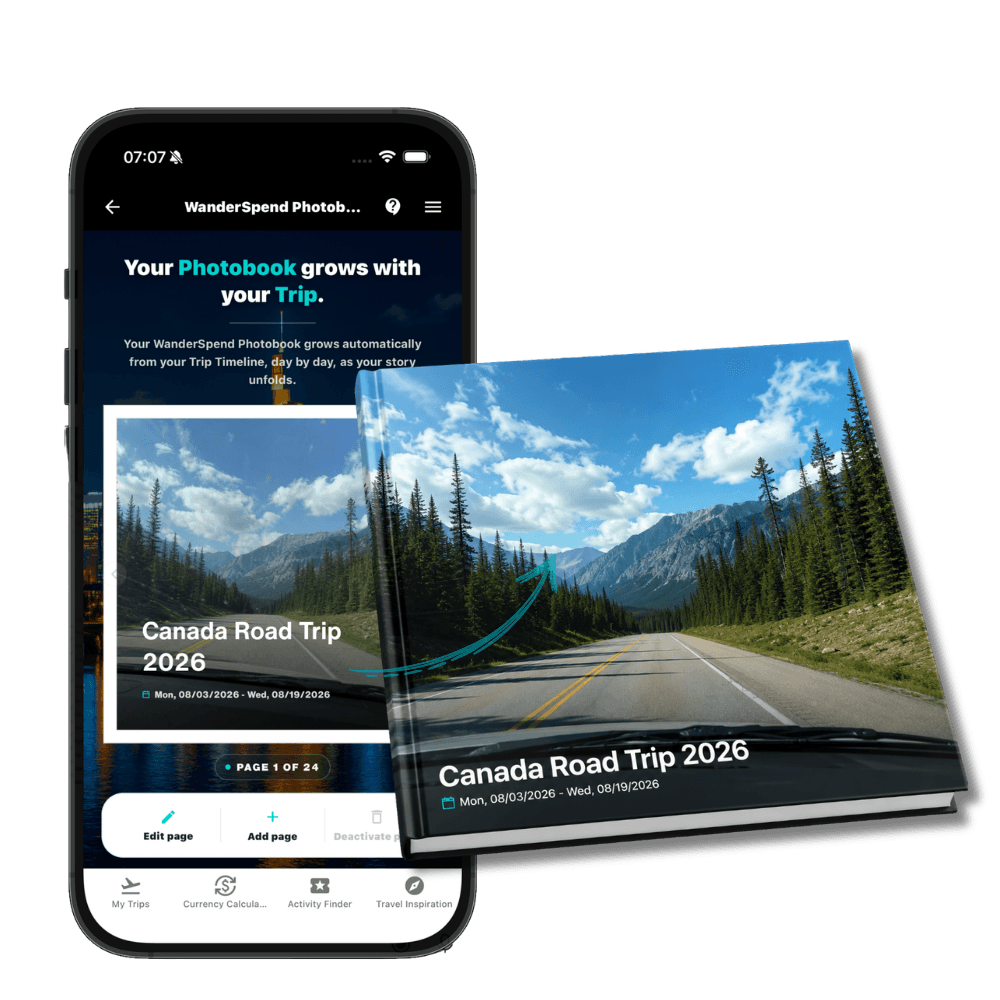
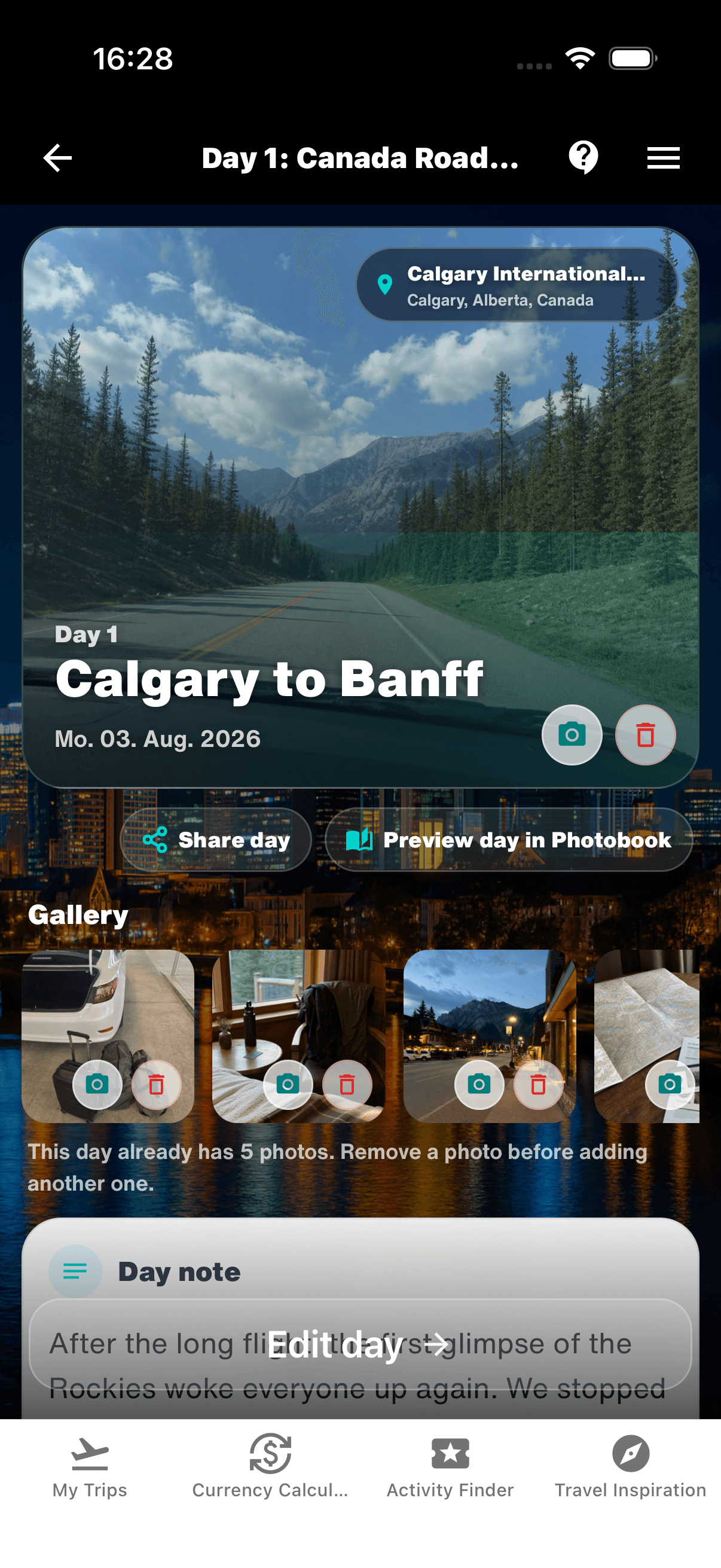
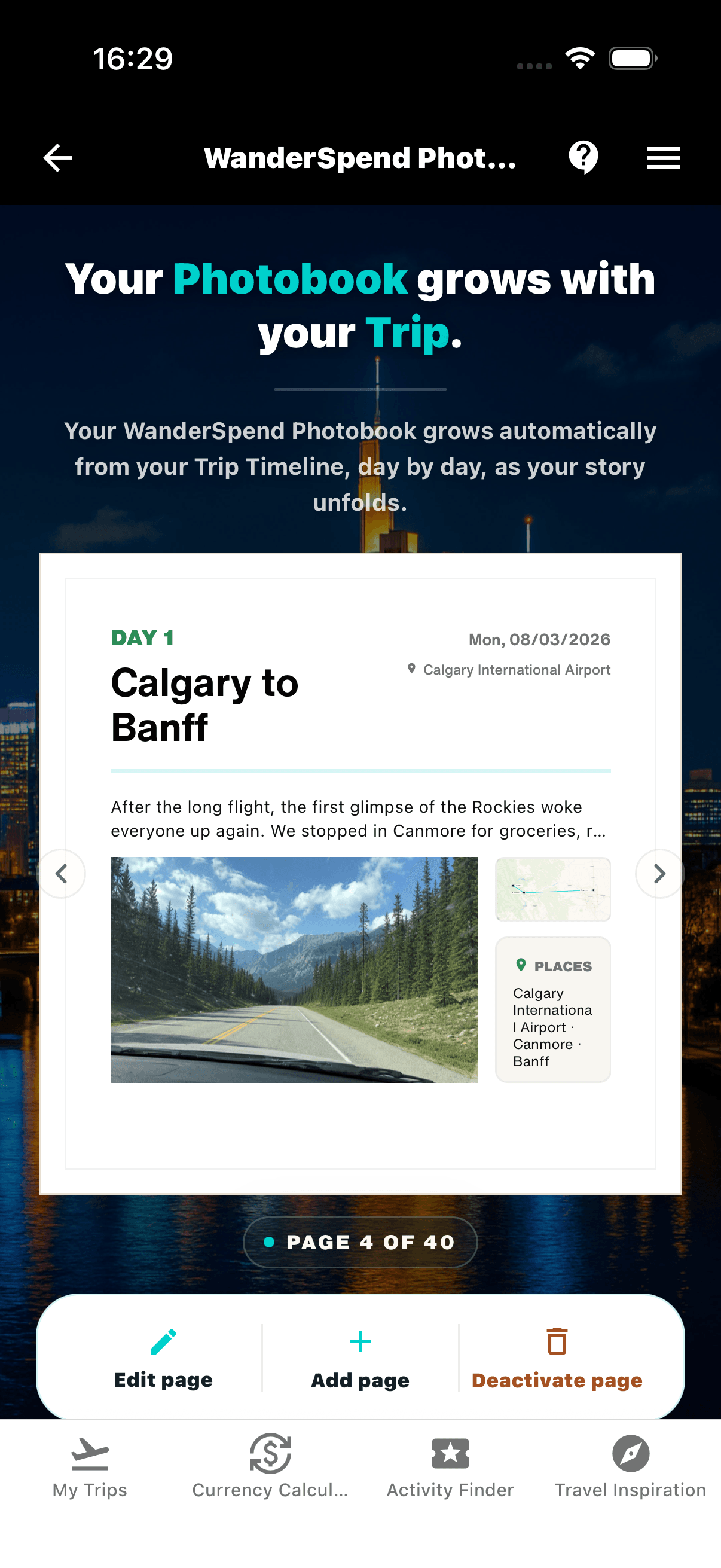
WanderSpend treats the photobook preview as part of the active trip. A DayCard brings together the selected places, a short note and a restrained photo selection. The resulting page can be opened immediately, while the day is still fresh.
The advantage is timing. By the end of the journey, the book already has a chronological structure and the notes were written close to the events. The character is closer to a travel journal than a loose collection assembled from favourite images several months later.
1. Capture the travel day

2. Review the page immediately
Strengths
- + The journal and book are largely assembled when the trip ends
- + Notes and photo choices stay close to the moment
- + Live preview makes gaps visible during the journey
- + Map, timeline, documents, expenses and memories remain in one private trip space
Limitations
- - A short regular habit is needed during the trip
- - Less typography and layout freedom than a specialist editor
- - Places are selected deliberately instead of captured by continuous tracking
- - WanderSpend is younger and is not a large social travel network
This is a newer concept, not a universal upgrade. Someone who looks forward to hours of photo selection, font experiments and layout variations will be happier with CEWE. Someone who wants a precise background-tracked route should prefer Polarsteps or FindPenguins.
Which travel photo book app should you choose?
Use-case matrix
You enjoy designing every spread
CEWE
The editor gives detailed control and makes the design phase part of the creative project.
The automatically recorded route should lead the story
Polarsteps
Steps, route, statistics and photographs feed a dedicated Travel Book workflow.
You want as little layout work as possible
FindPenguins
The service arranges the existing travel profile with deliberately limited direct page editing.
You want a photo journal for travel and family life
Journi
The broader journal and print ecosystem extends beyond route-led trips.
You want the journal to be largely finished when the trip ends
WanderSpend
DayCards and a live preview keep the book connected to the active journey.
You want maximum design control and in-the-moment notes
Hybrid workflow
Keep a concise journal during the trip, then rebuild the final pages in a manual editor.
The sensible hybrid
The categories do not have to be exclusive. A strong hybrid is to write short notes and make a deliberate photo shortlist during the trip, then transfer that material into a manual editor afterward.
This takes more time, but it solves the main weakness of the classic workflow: the words and small details already exist before memory turns the trip into a sequence of scenic highlights.
For the method rather than the app choice, read How to make a travel photo book: three workflows compared.
Final verdict
Choose by workflow, not by brand recognition:
- CEWE for deliberate manual design
- Polarsteps for a polished route-led Travel Book
- FindPenguins for a highly automated travel-profile book
- Journi for a flexible photo journal and print ecosystem
- WanderSpend for a private live travel journal that grows during the trip
No option wins every category. The useful decision is whether you want to spend more attention on the design after returning, on the travel record that feeds a generator or on a small journal habit while the journey is still happening.
Related travel app comparisons
How to Make a Travel Photo Book: 3 Workflows Compared
A manual photo book offers maximum creative control, a travel tracker turns recorded journeys into a book, and a live workflow lets the journal take shape while the trip is still happening.
Polarsteps Travel Book Alternatives: Which Workflow Fits?
A useful Polarsteps photo-book alternative should replace the part of the workflow you actually want to change: tracking, book generation, design freedom or the timing of the journal.
Best Travel Journal Apps: Polarsteps, FindPenguins, Journi and WanderSpend
The right travel journal app depends on whether you want automatic tracking, route files, social sharing, a flexible photo journal or a private trip space.
Wanderlog vs WanderSpend 2026: Free, Pro or Private?
Find Wanderlog's Free and Pro cost, what each plan includes and whether its planning tools or WanderSpend's private trip space fit your trip.
Wanderlog vs Lambus: Which Trip Planner Is Better?
Wanderlog is strongest for itinerary and road trip building; Lambus is a broader shared trip hub for stops, documents, expenses and group updates.
FAQ
What is the best travel photo book app?+
There is no single best app for every workflow. CEWE suits detailed manual design, Polarsteps and FindPenguins suit route-led books, Journi suits flexible photo journals and print choices, and WanderSpend suits travelers who want a private journal and live book preview during the trip.
Which travel photo book app creates the book automatically?+
Polarsteps and FindPenguins generate books from recorded trip content. Journi also turns journal content into print products. The available editing controls and the role of the route differ between the services.
Which app gives me the most control over fonts and layouts?+
A specialist manual editor such as CEWE provides the strongest control over typography, image placement, backgrounds and page layouts.
Can a photo book be ready when the trip ends?+
Yes. Tracker-generated books can use content recorded during the trip, and WanderSpend makes the preview part of each travel day. The remaining work depends on how complete the entries and photo choices are.
What is the best Polarsteps Travel Book alternative?+
Choose CEWE for manual creative control, FindPenguins for another route-led generated book, Journi for a photo-first journal and print ecosystem, or WanderSpend for a private live journal whose book preview grows during the trip.
Does WanderSpend offer the same design freedom as CEWE?+
No. WanderSpend focuses on a calm day-by-day journal and a growing preview. Travelers who enjoy trying many fonts, moving every element and rebuilding layouts should choose a specialist manual editor.
Sources and verification notes
Official information about app and desktop creation, layouts, text, formats and manual design options.
Last checked: 2026-08-24
Polarsteps - What is a Travel Book?
Official description of Travel Books generated from route, statistics, stories and photos.
Last checked: 2026-08-24
Polarsteps - Travel Book editing guide
Official information about previewing and editing Travel Book content.
Last checked: 2026-08-24
FindPenguins - Your Travels in a Book
Official description of a book generated from profile texts, maps, photos and statistics.
Last checked: 2026-08-24
FindPenguins Support - Edit a photo book
Official explanation of the generated preview and Footprint-based editing workflow.
Last checked: 2026-08-24
Official information about photo journals, maps, timelines, collaboration and print products.
Last checked: 2026-08-24
WanderSpend - Before, during and after a trip
Official workflow for DayCards, selected photos, notes and the live Photobook preview.
Last checked: 2026-08-24
Official demonstration of the live travel-journal and Photobook concept.
Last checked: 2026-08-24