
Best-of comparison
Best Travel Itinerary Apps & Templates 2026: Pricing Compared
Compare Wanderlog, Lambus, TripIt, Google Sheets and WanderSpend for itinerary planning, bookings, templates, free plans and privacy.
Keep comparing
Narrow down the choice
These comparisons are the best match for the decision you are making now.
A travel itinerary app should match the stage of the trip. Wanderlog is the strongest conventional itinerary builder here, Lambus fits complex group planning, TripIt organizes existing bookings, Google Sheets gives you a flexible template, and WanderSpend keeps final places, documents, costs and memories together privately.
A spreadsheet, a road trip planner and a booking organizer solve different problems. This guide compares five practical approaches:
- Wanderlog for detailed itinerary and route planning
- Lambus for collaborative all-in-one trip planning
- TripIt for automatically organizing booked travel
- Google Sheets for a flexible travel itinerary template
- WanderSpend for a private trip space without a paid app tier
Pricing at a glance: Google Sheets and WanderSpend have no paid travel-planning tier. Wanderlog Pro starts at 39.99 USD per year and TripIt Pro costs 49 USD per year on the official pages checked on August 12, 2026. Lambus offers an optional PRO tier whose current price should be checked in the relevant store or checkout.
Best itinerary tool by planning style
Best free itinerary builder
Wanderlog is the strongest fit if you want to collect places, build days, view a map and collaborate before deciding whether Pro is useful.
Best all-in-one group planner
Lambus fits complex group trips that need stops, an itinerary, documents, expenses and shared planning in one workspace.
Best for booked reservations
TripIt is best when flights, hotels, rental cars and other confirmations should become one itinerary with minimal manual work.
Best itinerary template
Google Sheets is the most flexible choice if you want custom columns, formulas, costs and a layout you fully control.
Best private subscription-free trip space
WanderSpend fits travelers who want places, days, documents, budgets and memories together without a Pro or subscription tier.
Travel itinerary apps compared
| Criteria | Wanderlog | Lambus | TripIt | Google Sheets | WanderSpendOur app |
|---|---|---|---|---|---|
| Best for | Detailed itineraries and road trips | Collaborative all-in-one planning | Organizing booked reservations | Custom itinerary templates | Private trip organization |
| Planning style | Places, days, maps and routes | Stops, itinerary, documents and group workspace | Booking-led master itinerary | Rows, columns, tabs and formulas | Trip Map, timeline, documents and notes |
| Collaboration | Live collaboration in Free | Group planning is central | Share plans with others | Flexible shared editing and comments | Primarily a private trip space |
| Booking workflow | Manual import in Free; automatic Gmail scanning in Pro | Bookings and documents inside the trip | Forward confirmation emails to build the itinerary | Manual entry or pasted links | Store documents and notes manually |
| Route and map tools | Map and itinerary together; optimization in Pro | Stops and route planning; advanced routing in PRO | Transport context, nearby places and airport maps | No native travel map workflow | Deliberately added places on a private Trip Map |
| Offline use | Offline mobile access in Pro | Check current plan and device access before travel | Itinerary available offline | Possible after offline setup | Important loaded trip information stays available |
| Budget context | Budget and expenses inside the planner | Expenses inside the trip; export and currencies in PRO | Not a budget-first app | Fully custom formulas and categories | Expenses, shared costs and currency tools |
| Pricing model | Free plus Pro from $39.99/year on the official web page | Free plus PRO | Free plus Pro at $49/year on the official web page | Usable with a personal Google account | Free app with no Pro or subscription tier |
Travel itinerary app and template pricing compared
| Tool | Free option | Paid layer | When paid is most useful | | --- | --- | --- | --- | | Wanderlog | Itinerary, places, map, manual booking import and collaboration | Pro from 39.99 USD/year on the checked official web page | Offline mobile access, route optimization, Gmail scanning and exports | | Lambus | Core trip and group planning | Optional PRO; check the current checkout | Advanced routing, currencies and trip or expense exports | | TripIt | Core booking itinerary | Pro at 49 USD/year on the checked official web page | Live flight alerts, disruption help and airport tools | | Google Sheets | Usable with a personal Google account | No travel-specific paid tier | A paid workspace is not required for a personal itinerary template | | WanderSpend | Free app without a Pro tier | No paid app subscription | Printed photobooks are separate from the app |
Prices and offers can change by country, store and promotion. These figures reflect the official web pages checked on August 12, 2026; verify the checkout shown for your account before buying.
App or travel itinerary template: which do you need?
Choose an itinerary app when the structure should do work for you. Maps, routes, booking imports, reminders and mobile navigation are difficult to recreate well in a spreadsheet.
Choose a travel itinerary template when you want to decide the structure yourself. A sheet can contain exactly the columns your trip needs: date, city, hotel, confirmation number, train, estimated cost, actual cost and status.
The trade-off is maintenance. A template starts clean but depends on manual updates. An app can connect information and reduce repetitive work, but its preferred structure, account model and paid limits shape the trip.
Choose by planning problem
You are still deciding what to do each day
Wanderlog
Its places, itinerary and map workflow is built for shaping a trip before departure.
Several travelers need one planning workspace
Lambus
Lambus combines itinerary, stops, files and expenses for planning-heavy group trips.
Most of the trip is already booked
TripIt
Forwarding confirmations is faster than rebuilding flight, hotel and car details manually.
You need a custom travel itinerary template
Google Sheets
Use your own columns, formulas, tabs and formatting without adopting a travel app workflow.
You want calm private organization during the trip
WanderSpend
Places, days, files, costs and memories stay together without a subscription tier.
Best free itinerary builder: Wanderlog
Wanderlog is the strongest conventional itinerary builder in this comparison. Its free plan includes unlimited places, live collaboration, manual flight and hotel imports, recommendations, and an itinerary with a map in the same view.
That combination works well for city breaks and road trips. You can collect potential stops, assign them to days and see how the plan fits geographically.
Wanderlog Pro currently starts at $39.99 per year on the official website. Pro adds offline mobile access, route optimization, Google Maps export, automatic Gmail scanning, unlimited attachments and other advanced features.
Strengths
- + Useful free itinerary and map workflow
- + Strong choice for road trips and multi-stop planning
- + Live collaboration is included in the free plan
- + Manual booking imports and unlimited places in Free
- + Pro adds valuable automation and route tools
Limitations
- - Offline mobile access and route optimization are listed under Pro
- - Can feel like a planning workspace rather than a calm travel archive
- - Automatic Gmail scanning requires a connected-account workflow
- - Exact offers can vary by region or store
Read the focused comparison Wanderlog vs WanderSpend if those are your final two choices.
If reservation organization is the other finalist, use the direct TripIt vs Wanderlog comparison.
Best all-in-one group planner: Lambus
Lambus is broader than an itinerary list. It brings stops, routes, documents, travel details, expenses and collaboration into one planning workspace available on mobile and the web.
That makes it useful when a trip has several travelers and many moving parts. The group can work from one structure rather than spreading the plan across chat messages, PDFs and separate budget sheets.
Lambus is free to start, with a paid PRO layer. Its official PRO page includes advanced route planning, expense export to Excel, trip PDF export, foreign currencies, flight updates and other planning features.
Strengths
- + Broad all-in-one planning workflow
- + Strong fit for collaborative group trips
- + Stops, documents and expenses stay connected
- + Mobile and web access
- + PRO adds routing, export and currency tools
Limitations
- - More workspace-like than a lightweight itinerary
- - Several advanced planning features require PRO
- - May be excessive for a short or already-booked trip
- - Current price should be checked in the relevant store or checkout
For a direct decision, see Lambus vs WanderSpend.
Best for automatically organizing bookings: TripIt
TripIt starts after you book. Forward flight, hotel, rental car, train and other confirmation emails to TripIt, and the service turns them into a master itinerary.
The free plan organizes travel plans, syncs them with a calendar, stores important trip information, supports sharing, shows transport and nearby-place context, and allows up to three document uploads per trip. TripIt also says the itinerary is accessible offline.
TripIt Pro currently costs $49 per year on the official website. It adds real-time flight alerts, fare monitoring, alternate-flight help, check-in reminders, airport navigation, baggage information and up to 25 documents per trip.
TripIt is less useful when you are still brainstorming places. It is strongest when the bookings already exist and administrative clarity matters more than visual day planning.
The focused TripIt vs Wanderlog comparison shows where booking automation ends and map-led itinerary design begins.
Strengths
- + Fast booking-led itinerary creation
- + Useful free plan for core reservation organization
- + Works across different booking providers
- + Offline itinerary access
- + Pro is strong for frequent flyers and disruption alerts
Limitations
- - Less suited to inspiration and day-by-day place discovery
- - Not a budget-first planner
- - Email-forwarding workflow may not suit privacy-sensitive travelers
- - The most valuable live travel alerts require Pro
Best travel itinerary template: Google Sheets
Google Sheets is not a dedicated travel app, and that is precisely its strength for some trips.
You can build one row per day or booking and use separate tabs for:
- itinerary and times
- hotels and confirmation numbers
- transport
- estimated and actual costs
- packing or booking status
- useful links and addresses
Google provides a template gallery and supports shared editing, comments, version history and protected ranges. Existing templates can be copied and adapted, or you can create a travel itinerary from a blank sheet.
The weakness is travel context. Sheets does not automatically understand that a row is a hotel, calculate a sensible road trip route or turn bookings into a mobile itinerary. Offline use also needs to be configured before departure.
Strengths
- + Maximum control over structure and formatting
- + Flexible formulas for estimates and actual costs
- + Easy shared editing and comments
- + Simple to duplicate for future trips
- + No dedicated travel-app learning curve
Limitations
- - Manual data entry and maintenance
- - No native itinerary map or route optimization
- - Mobile use can feel cumbersome
- - Easy to create an overcomplicated spreadsheet
- - Offline access needs preparation
Best private trip space without a paid tier: WanderSpend
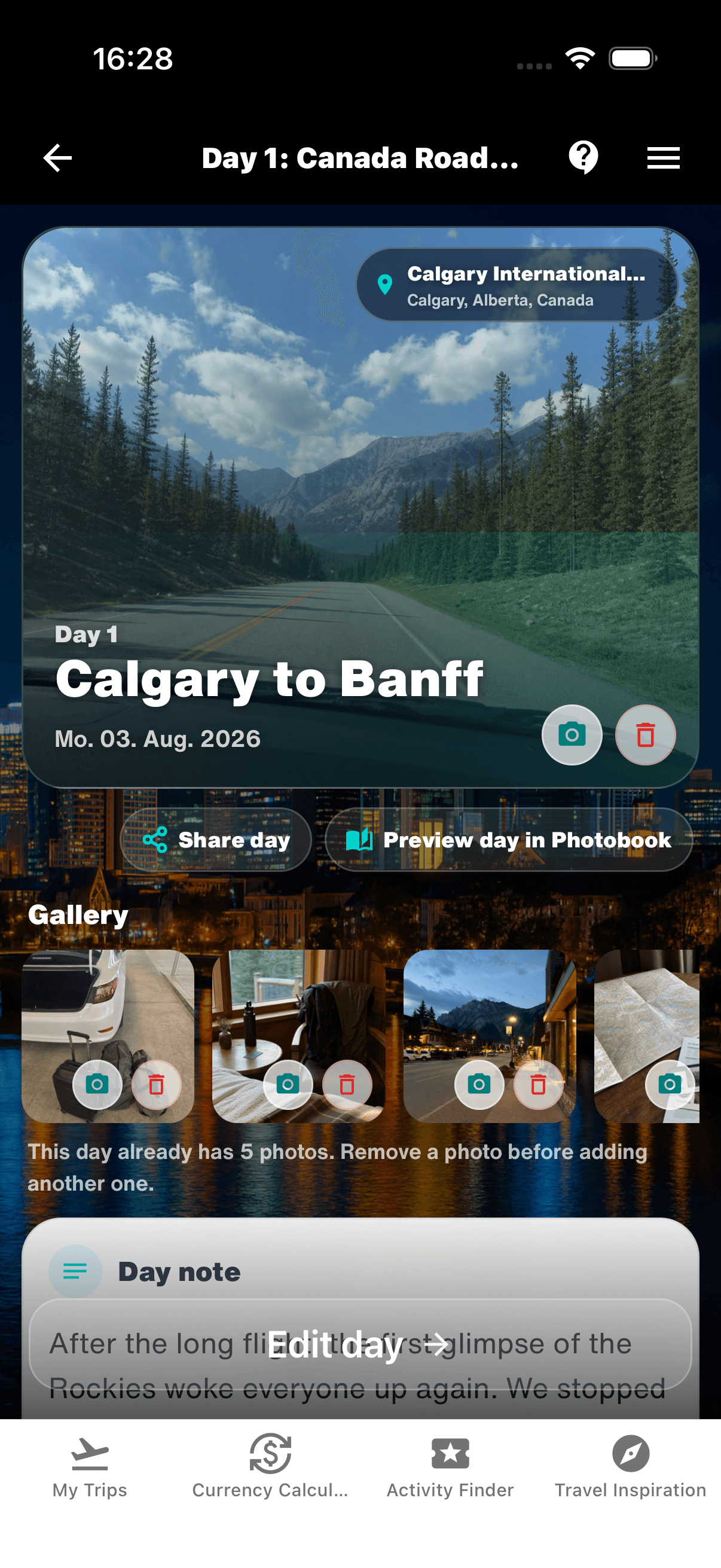
WanderSpend is not a heavy itinerary builder. It is a private place to keep the trip understandable before, during and after travel.
It connects:
- saved places and Trip Map
- days and timeline
- documents, checklists and notes
- expenses, shared costs and currency tools
- photos, favorite moments and trip memories
The dedicated travel app is free without a Pro or subscription tier. It is also positioned around privacy, no ads and no third-party tracking. Optional printed photobooks are a separate physical product, not a paid app plan.
WanderSpend is the better fit when you do not need route optimization or collaborative itinerary construction, but want one calm place for the information that matters while the trip unfolds.
Strengths
- + Free app without a Pro or subscription tier
- + Private trip map, timeline, documents, budget and memories
- + No ads or third-party tracking
- + Useful trip context beyond a rigid itinerary table
- + Live photobook preview for turning the completed trip into a printed memory
Limitations
- - Not designed for complex route optimization
- - Not a collaboration-first itinerary workspace
- - Bookings are organized manually rather than imported from email
- - Younger than Wanderlog, Lambus and TripIt
Planned places become real travel days

Free vs paid: when is Pro worth it?
A paid itinerary plan is worthwhile when it removes recurring friction, not merely because it unlocks more features.
Wanderlog Pro makes sense when offline mobile access, optimized routes, automatic Gmail scanning or Google Maps export would save significant time. TripIt Pro is most compelling for frequent flyers who benefit from live alerts, alternative flights and airport guidance. Lambus PRO fits complex plans that need advanced routing, currencies and exports.
Stay with a free option when the trip is simple, the group is small or manual planning is part of the enjoyment. Wanderlog Free is already capable for itinerary building. Google Sheets works for fully custom templates. WanderSpend is the only dedicated travel app in this comparison without a paid app tier.
A practical itinerary workflow
You do not necessarily need to choose only one tool.
- Collect ideas and test the route in Wanderlog or Lambus.
- Keep confirmed flights and hotels in TripIt if booking automation matters.
- Use a Google Sheet only when the trip needs custom calculations or a printable table.
- Keep the final places, documents, costs and memories in WanderSpend if you want a private trip record.
The goal is not to duplicate every detail in every app. Decide which tool owns the itinerary, which one owns bookings and which one should remain useful after the trip.
For a broader overview, compare the best travel apps. If costs are the main problem, start with the best travel budget apps. If data collection is your main concern, see the guide to private travel apps.
Final verdict
Choose Wanderlog for detailed itinerary building and road trips. Choose Lambus for a broad collaborative planning workspace. Choose TripIt when booked reservations should organize themselves. Choose Google Sheets when full template control matters more than travel-specific automation.
Choose WanderSpend when you want the trip itself—places, days, documents, costs and memories—to stay together privately without an app subscription.
Related travel app comparisons
Wanderlog Cost 2026 vs WanderSpend: Free or Pro?
Wanderlog Free covers core itinerary planning; Pro adds offline access and advanced route tools. Compare both with WanderSpend's free private trip space.
Wanderlog vs Lambus: Which Trip Planner Is Better?
Wanderlog is strongest for itinerary and road trip building; Lambus is a broader shared trip hub for stops, documents, expenses and group updates.
Wanderlog vs FindPenguins: Planner or Travel Journal?
Wanderlog organizes the trip before departure; FindPenguins records the route and turns it into a flexible travel journal.
TripIt vs Wanderlog: Booking Organizer or Trip Planner?
TripIt turns confirmations into an operational itinerary; Wanderlog helps build the route, stops and days before booking is complete.
Tricount Alternatives for Travel: Choose by Missing Feature
The right Tricount replacement depends on what should change: collaboration depth, budget control or the wider planning workflow.
FAQ
What is the best free travel itinerary app?+
Wanderlog has the strongest free itinerary-building workflow in this comparison, with places, maps, collaboration and imported bookings. WanderSpend is the better free option if you want a private trip space without a Pro tier. Google Sheets is the most flexible free template approach.
Is a travel itinerary template better than an app?+
A template is better when you want total control over columns, costs and formatting. An app is better when you want maps, route logic, reservation import, reminders or a mobile-first workflow.
Which itinerary app works offline?+
Wanderlog lists offline mobile access as a Pro feature on its current official pricing page, while TripIt says itineraries can be accessed offline. Google Sheets can work offline after it is configured, and WanderSpend keeps important loaded trip information available for offline use.
How much do travel itinerary apps cost?+
Wanderlog and Lambus use free-plus-paid models, while TripIt currently lists Pro at $49 per year on its website. Store and regional prices can vary. WanderSpend has no app subscription or Pro tier, and Google Sheets can be used with a personal Google account.
Which itinerary app is best for group travel?+
Wanderlog and Lambus are the strongest dedicated choices for collaborative itinerary planning. A shared Google Sheet is better when the group wants a completely custom structure and does not need built-in route planning.
Sources and verification notes
Official product positioning for itinerary planning, road trips, maps and collaboration.
Last checked: 2026-08-12
Official free-versus-Pro comparison used to verify pricing and premium features.
Last checked: 2026-08-12
Official positioning for stops, itineraries, travel documents, expenses and group planning.
Last checked: 2026-08-12
Official PRO page used to verify advanced route planning, exports, foreign currencies and other paid features.
Last checked: 2026-08-12
Official comparison of TripIt Free and TripIt Pro, including current annual web pricing.
Last checked: 2026-08-12
Google Docs Editors Help — Use templates
Official instructions for using and copying templates in Google Docs and Sheets.
Last checked: 2026-08-12
Google Docs Editors Help — Collaborate in Sheets
Official guidance for sharing, comments, version history and protected ranges in Google Sheets.
Last checked: 2026-08-12
Official product positioning, pricing model and public app links.
Last checked: 2026-08-12